Your shack wall for propagation, DX, and contest awareness

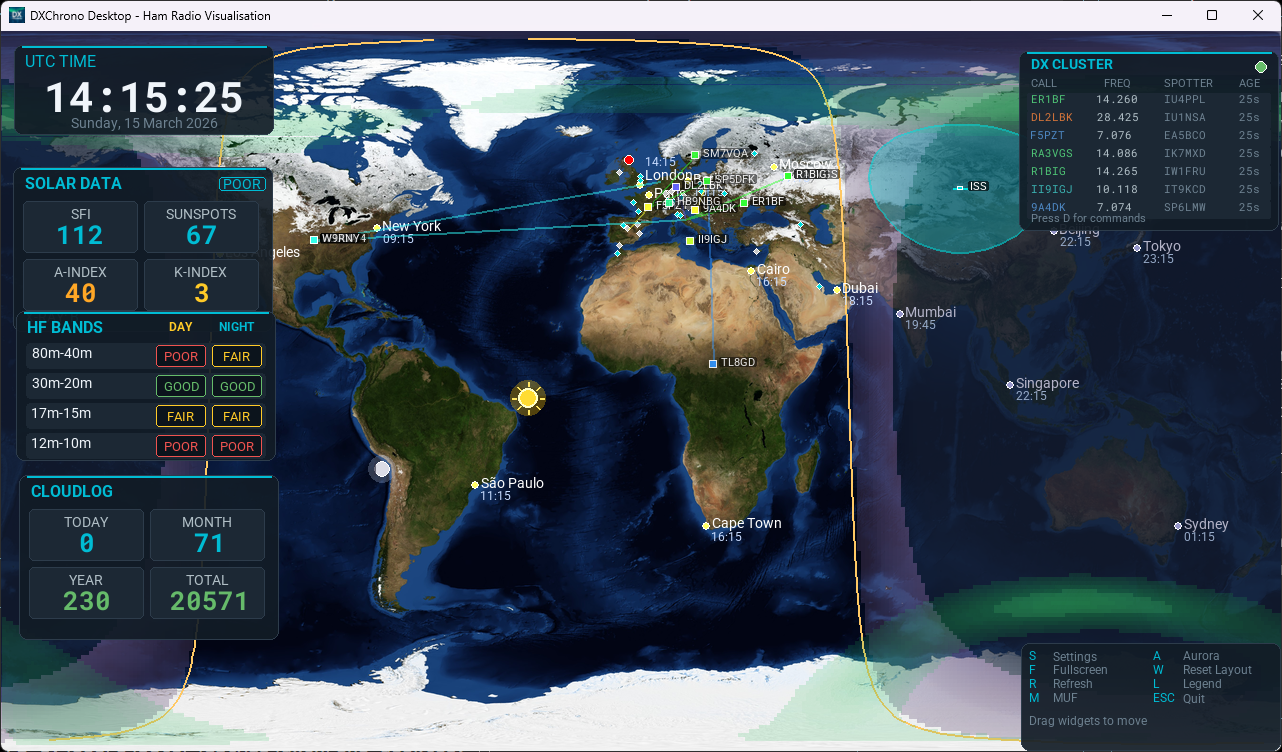
Built for radio amateurs: one full-screen world view in 3D globe or flat map, with grey line, NOAA solar indices and HF band conditions, a worldwide F5LEN tropo overlay for VHF openings, aurora and MUF layers, your QTH, optional cities and grid/CQ/ITU layers, plus live spots, logging context, N1MM+, satellite footprints, and a Special Event mode for club stations. Fewer tabs, more time on the air.

Windows macOS Linux Raspberry Pi

One-time payment

£15.00

Includes VAT. Secure checkout powered by Stripe.

Buy Desktop (opens in new tab)

After checkout, you receive an email with your licence key and download links for Windows, macOS, Linux, and Raspberry Pi.

Prefer the web app? dxchrono.com stays free.

Operator-grade features for HF, VHF, and Satellites

Shack-ready situational awareness, wired into the services hams actually use, not a generic weather app. New: a full worldwide tropo map layer from F5LEN.

Worldwide tropo overlay (F5LEN)

See where tropospheric enhancement is building across the globe: the current 3-hour refractive-index forecast from F5LEN, colour-matched to tropo.f5len.org, on both the flat map and the 3D globe. Toggle with T when you are watching VHF openings.

3D globe & 2D flat map

Switch between a 3D globe and a 2D flat map to match your operating style, from global long-path awareness to familiar desk-map viewing for daily station use.

Propagation & bands

Layer grey line with twilight, NOAA solar flux, A/K indices, sunspot number, HF band conditions (day/night), optional VHF aurora and E-skip (Europe or North America), aurora and MUF overlays (keyboard toggles), plus optional grid / CQ / ITU and city clocks. Pair with the tropo overlay when VHF ducts are the story of the day.

Live spots: Cluster, PSK, Reverse Beacon

Telnet DX Cluster (DX Spider / AR / CC) with spots on the map, labels, and optional propagation lines. PSK Reporter: who hears you and who you hear, map markers, and a scrollable widget with an SNR bar per spot. Reverse Beacon skimmer spots for your callsign, map markers, and SNR context at a glance.

SOTA and POTA

Live Summits on the Air and Parks on the Air spots on the map and in widgets, plus planned SOTA alerts and scheduled POTA activations. Double-click a marker or row to open the summit or park page.

Watch List

Add callsigns you care about and get alerted when they appear on DX Cluster, PSK Reporter, Reverse Beacon, SOTA, or POTA, so you do not miss a chase while operating.

Sun & Moon at your QTH

Optional Az/El widget for Sun and Moon from your station coordinates or grid, useful for satellite windows, Earth-Moon-Earth, and antenna planning.

Contest & logging context

N1MM Logger+ UDP (radio, app info, recent QSOs on the map), Cloudlog API for stats and contacts, plus QRZ Logbook and standard ADIF file support so recent QSOs can be mapped directly on your station display.

Contest Calendar widget

Follow upcoming and live contests in a dedicated widget with clear status, start/end timing, and countdowns in days, hours, and minutes, with cleaner spacing for quick at-a-glance reading.

Satellite passes & footprints

Track selected amateur satellites with optional labels and visibility footprints on the map (TLE-based), plus an Upcoming Passes widget showing AOS/LOS, max elevation, track direction, and live ETA countdowns.

Special event & display modes

Special Event mode for field days and club open days: branding, last-worked banner, contacts today, distance, fed by Cloudlog or N1MM+.

Free browser version vs paid Desktop

Comparison of the free browser app and paid Desktop
Capability dxchrono.com (Free) Desktop (£15 one-time)
General map and propagation view Yes Yes
3D globe map view No Yes
Aurora forecast overlay Yes (browser) Yes (full controls, desktop rendering)
MUF (Maximum Usable Frequency) overlay No Yes
Worldwide tropo overlay (F5LEN) No Yes (3-hour forecast, map and globe)
Dedicated local shack app experience No Yes (Windows, macOS, Linux, Raspberry Pi)
Full screen / kiosk-first operation Limited by browser setup Built for it
Cloudlog integration Yes Yes
QRZ Logbook integration No Yes
ADIF file integration No Yes
N1MM+ contest integration No Yes
DX Cluster support No Yes
PSK Reporter support No Yes
Reverse Beacon Network No Yes
Watch List No Yes
Summits on the Air (SOTA) No Yes
Parks on the Air (POTA) No Yes
Upcoming Contests widget No Yes
Satellite tracking and footprints No Yes
Sun and Moon at your QTH Yes Yes
PSK Reporter widget (SNR bar, scrollable list) No Yes
Advanced operating integrations Cloudlog only N1MM+, Cloudlog, QRZ Logbook, ADIF, DX Cluster, PSK Reporter, Reverse Beacon, SOTA, POTA, Watch List, satellites
Pricing model Free £15.00 one-time (includes VAT) via Stripe

System requirements

DXChrono is a full desktop map app, not a lightweight HamClock clone. A normal PC or mini-PC is comfortable; a Raspberry Pi 4 or 5 works as a dedicated wall display.

Windows, macOS, Linux

64-bit PC or Mac. 4 GB RAM is the minimum; 8 GB is more comfortable. A typical Intel or AMD mini-PC is a good shack display. 1080p is the sweet spot; 4K is fine on a decent machine.

Raspberry Pi

Pi 4 or Pi 5 with a 64-bit OS. 2 GB RAM is the floor for a 2D wall display; 4 GB is recommended. Use the ARM64 Raspberry Pi download.

Not a good fit

Raspberry Pi 3 and earlier, 32-bit ARM, and small HamClock appliances such as the Inovato Quadra (Pi 3-class CPU). Keep HamClock on those; run DXChrono on a mini-PC or a Pi 4/5.

Full detail, including how to tune a 2 GB Pi: System requirements in the docs (opens in new tab).

Upgrade from basic viewing to a full operating dashboard

Buy DXChrono Desktop once and run a powerful, cross-platform station display built for daily operation — including the new worldwide F5LEN tropo overlay for VHF.

Buy DXChrono Desktop for £15.00 (inc VAT) (opens in new tab)

Secure checkout via Stripe. Price includes VAT and ongoing desktop updates. Each download archive includes the End User Licence Agreement (EULA) text file alongside the binary. The browser version at dxchrono.com stays free. Check system requirements before you pick a Pi or mini-PC. Documentation: docs.desktop.dxchrono.com (opens in new tab).